


TechFX(テックエフエックス)の新規口座開設手順について、
We will explain it with diagrams and smartphone images so that anyone can easily understand it
結論から言うと、TechFX(テックエフエックス)は、
You can easily open an account and set up cashback in just one step
- Step1:TechFXのアカウント作成
Contents
Step1:TechFXのアカウント作成
①TechFXのアカウント開設ページへ移動
まずは、下記のリンクからTechFXのアカウント開設ページに遷移します。
※こちらのリンク以外からの登録を行うとキャッシュバックが受け取れないのでご注意ください。
② Entering registration information
表示されたページに必要情報を入力します。
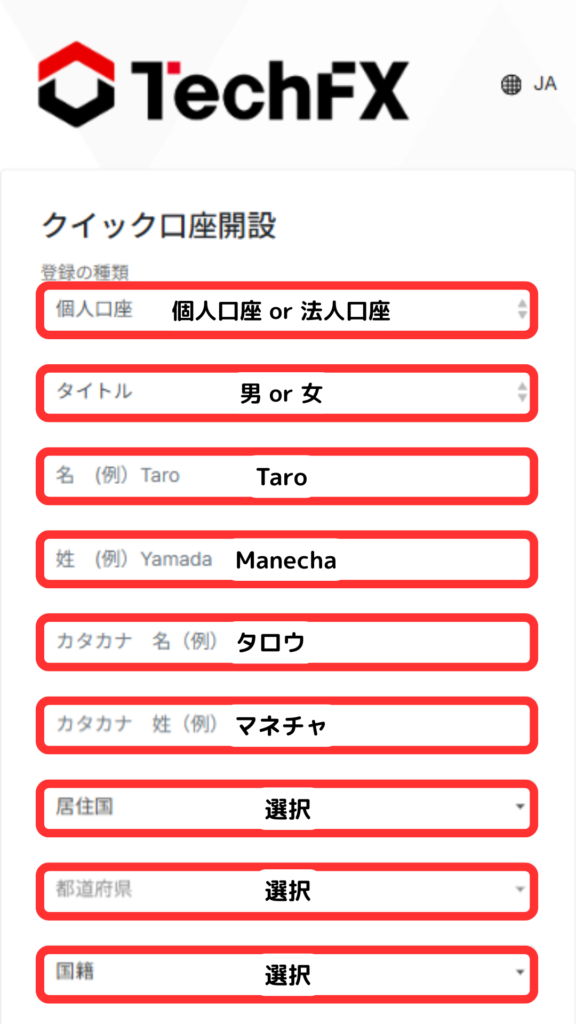

メールアドレスへリンクが飛びますので、タップしてください。

③書類のアップロード
「写真付き本人確認書」と「住所確認書類」の2種類を提出する必要があります。

Please select the documents you wish to submit

提出する書類の情報を記載してください。

タップして、書類単体の写真と書類とご自身の顔が映った写真の両方を提出してください。

書類提出後、TechFXにて審査が実施され、問題が無ければ1~2営業日程度で↓このようなメールが届きます。

④登録完了
お疲れ様でした。
これにてTechFX登録完了となります。
TechFXはオートリベートのため、マネチャにて口座登録申請していただく必要はございません。
トレードをおこなうと自動的にキャッシュバックがTechFXのIBウォレットへ反映されます。
In conclusion
以上がTechFX(テックエフエックス)の新規口座開設手順のスマホ画像付きの図解解説になります。

