

Axiory(アキシオリー)の新規口座開設手順について、
We will explain it with diagrams and smartphone images so that anyone can easily understand it
結論から言うと、Axiory(アキシオリー)は、
You can easily open an account in just two steps
- Step1:Axioryのアカウント作成
- Step2:取引口座の取得
Step1:Axioryのアカウント作成
①Axioryのアカウント開設ページへ移動
まずは、下記のリンクからAxiory(アキシオリー)のアカウント開設ページに遷移します。
https://portal.axiory.com/register/?clickid=AX10599674&aid=522456
*Please note that if you register through any link other than this one, you will not be able to receive cashback from Money Charger (Moneycha)
What is cashback with MoneyChat?
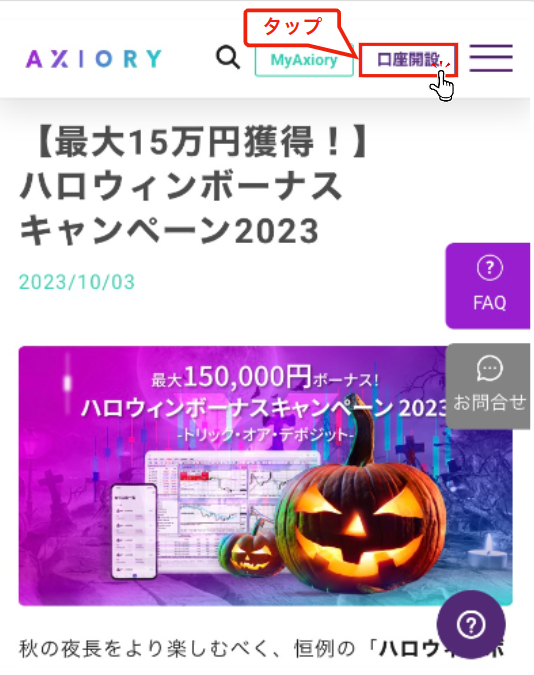
② Tap "Open an account"
「Axiory(アキシオリー)ページのURL」をタップするとAxiory(アキシオリー)の公式サイトが表示されます。
「口座開設」をタップし口座開設を行います。
③チェックを入れ「登録」をタップ
Axiory(アキシオリー)へ登録する情報を登録フォームへ入力します。


Please enter the following information correctly
- 名前:アルファベットで入力
- 姓:アルファベットで入力
- Email address: Enter the email address you wish to register
- 居住国:一覧から選択
- 国番号:一覧から選択
- 電話番号:登録する電話番号を入力
- Password: Enter the password you wish to register
- パスワードの再入力:登録するパスワードを再入力
登録フォームに入力する情報を入力した後、「プライバシーポリシーに同意します」をチェックします。
チェックが完了したら、「取引を開始する」をタップします。
④「メールアドレスを認証」をタップ
Axiory(アキシオリー)に登録したメールアドレス宛にメールが届くので、「メールアドレスを認証」をタップして確認しましょう。

以上でAxiory(アキシオリー)のアカウントの作成は完了です。
Step2:MT4取引口座の開設
①登録メールアドレスとパスワードを入力しログイン
Axiory(アキシオリー)のログイン画面が表示されるので、登録したメールアドレスとパスワードを入力します。

「ログインする」をタップして、Axiory(アキシオリー)のマイページにログインします。
②「アップグレードする」をタップ

Tap "Upgrade"
③「リアル口座を開設」をタップ
「リアル口座を開設」をタップします。

④希望するプラットフォームを選択し口座情報を入力した後「取引を開始する」をタップ
希望するプラットフォームを選択し口座情報を入力します。

以下の情報を選択し入力してください。
- プラットフォーム:cTarader・MetaTrader4・MetaTrader5の中から選択
- アカウントタイプ:各プラットフォームに用意された口座タイプを選択
- 通貨:通貨のタイプを選択
- レバレッジ:一覧から選択
Once you have finished entering the information, tap "Start Transaction"
⑤個人情報を入力
口座開設のための個人情報を入力します。
身分証明書等の書類と適合したものを入力してください。


Please enter the following information correctly
- 名:アルファベットで入力
- 姓:アルファベットで入力
- ミドルネーム:アルファベットで入力
- お名前:漢字で入力
- 国名:一覧から選択
- 都道府県:アルファベットで入力
- 市区町村郡:アルファベットで入力
- 郵便番号:半角数字
- 以降の住所:アルファベットで入力
- 私は上記の国納税者です。:当てはまっていればチェック
- 出生地と国籍は上記の国と同一です:当てはまっていればチェック
- 出生国:一覧から選択
- 国籍:一覧から選択
- 投資の資金源:いずれかを選択
- 投資の目的:いずれかを選択
入力を終えたら「送信」をタップします。
⑥言語の選択
言語を選択します。

⑦本人確認書類の発行国を選択
本人確認書類の発行国を選択します。

⑧提出する身分証明書の種類を選択
提出する身分証明書の種類を選択します。

⑨書類の撮影
書類を撮影しアップロードします。

書類の表面を「表面を撮影する」とタップし撮影した後、裏面も同じように撮影しアップロードします。
⑩認証されるまで待機
認証画面になるので、ウィンドウを閉じずに待機します。

⑩登録メールアドレスを確認し「新しいリアル口座を開設されました」を開く
Axiory(アキシオリー)から「新しいリアル口座を開設されました」というタイトルのメールが届いているので開きましょう。

The "Login" field will be used to register your account number with Moneychat
In conclusion
以上がAxiory(アキシオリー)の新規口座開設手順のスマホ画像付きの図解解説になります。
Next, go to your Money Charger My Page and apply to register your cashback account
Click here for an article explaining how to register for an FX account ↓